Container Environment Variables
This document provides guidance on environment variables required to run QueryPie ACP’s Server Container. This document applies to QueryPie 10.3.0 or later versions.
Basic Environment Variables
| Environment Variable Name | Default Value | Description |
|---|---|---|
| VERSION | QueryPie installation version.Example) 10.3.0This environment variable specifies the tag of the Container Image. | |
| AGENT_SECRET | Recommended value: 32-char random string via openssl rand -hex 16This is the secret key used for encrypted communication between QueryPie Container and User Agent. It must be set to 32 ASCII characters.If High Availability (HA) configuration is applied, all AGENT_SECRET values in the compose-env of two or more QueryPie Server Containers must be identical. | |
| KEY_ENCRYPTION_KEY | Recommended value: 16-char random string via openssl rand -hex 8This is a key used to encrypt and store the Data Encryption Key (DEK) that encrypts sensitive data in QueryPie Meta DB. KEK is used to encrypt DEK to prevent its exposure.DEK is a key used to encrypt secret values (Credentials) for DB connections and SSH server connections stored in QueryPie Meta DB. | |
| DB_HOST | Hostname or IP Address of MySQL used as Meta DB, Log DB, and Snapshot DB.For PoC purposes, if you install QueryPie Container, MySQL Container, etc. all on a Single Machine, you can enter host.docker.internal.If you configure a separate MySQL such as AWS Aurora instead of the Machine where QueryPie Container is installed, enter the Hostname or IP Address of that MySQL. | |
| DB_PORT | 3306 | TCP Port of MySQL used as Meta DB, Log DB, and Snapshot DB |
| DB_CATALOG | querypie | Catalog to be used by Meta DB |
| LOG_DB_CATALOG | querypie_log | Catalog to be used by Log DB |
| ENG_DB_CATALOG | querypie_snapshot | Catalog to be used by Snapshot DB |
| DB_USERNAME | Recommended value: querypieUsername of MySQL used as Meta DB, Log DB, and Snapshot DB | |
| DB_PASSWORD | Recommended value: 16-char random string via openssl rand -hex 8Password of MySQL used as Meta DB, Log DB, and Snapshot DB | |
| DB_MAX_CONNECTION_SIZE | 20 | Maximum number of connections used by QueryPie for Meta DB connections (20 recommended) |
| DB_DRIVER_CLASS | org.mariadb.jdbc.Driver | If Meta DB is AWS Aurora, it supports Failover when Aurora Instance partially fails.If you want to use Failover functionality by applying AWS Aurora, specify the dedicated driver software.amazon.jdbc.Driver provided by AWS. |
| REDIS_NODES | Enter Host and Port information to connect to QueryPie Redis. If you enter two or more Host and Port information, you can enter them separated by , like Host1:Port1,Host2:Port2.For PoC purposes, if you install QueryPie Container, Redis Container, etc. all on a Single Machine, you can enter host.docker.internal:6379.Host can be entered as an IP Address or FQDN. | |
| REDIS_PASSWORD | Recommended value: 16-char random string via openssl rand -hex 8Redis Password | |
| DAC_SKIP_SQL_COMMAND_RULE_FILE | skip_command_config.json | Configure to prevent SQL Queries automatically executed by tools (workbench tools such as DataGrip, DBeaver) rather than queries entered by users from being recorded in Audit Log.Tool-automated SQL Queries are sometimes called standardized Queries in the sense that the syntax patterns are predetermined.Configuring to prevent these standardized Queries from being recorded in Audit Log improves the response speed of 3rd Party Tools perceived by users. It helps reduce the performance load on QueryPie Server.For more details, please refer to Unknown Title#환경변수 추가.2 . |
Deprecated Environment Variables
Environment Variable Name | Default Value | Description |
QUERYPIE_WEB_URL | In version 10.2.8 or later, this value is set in the Web Console. It is not set in environment variables. This is the URL address of QueryPie for accessing the Web Console.
| |
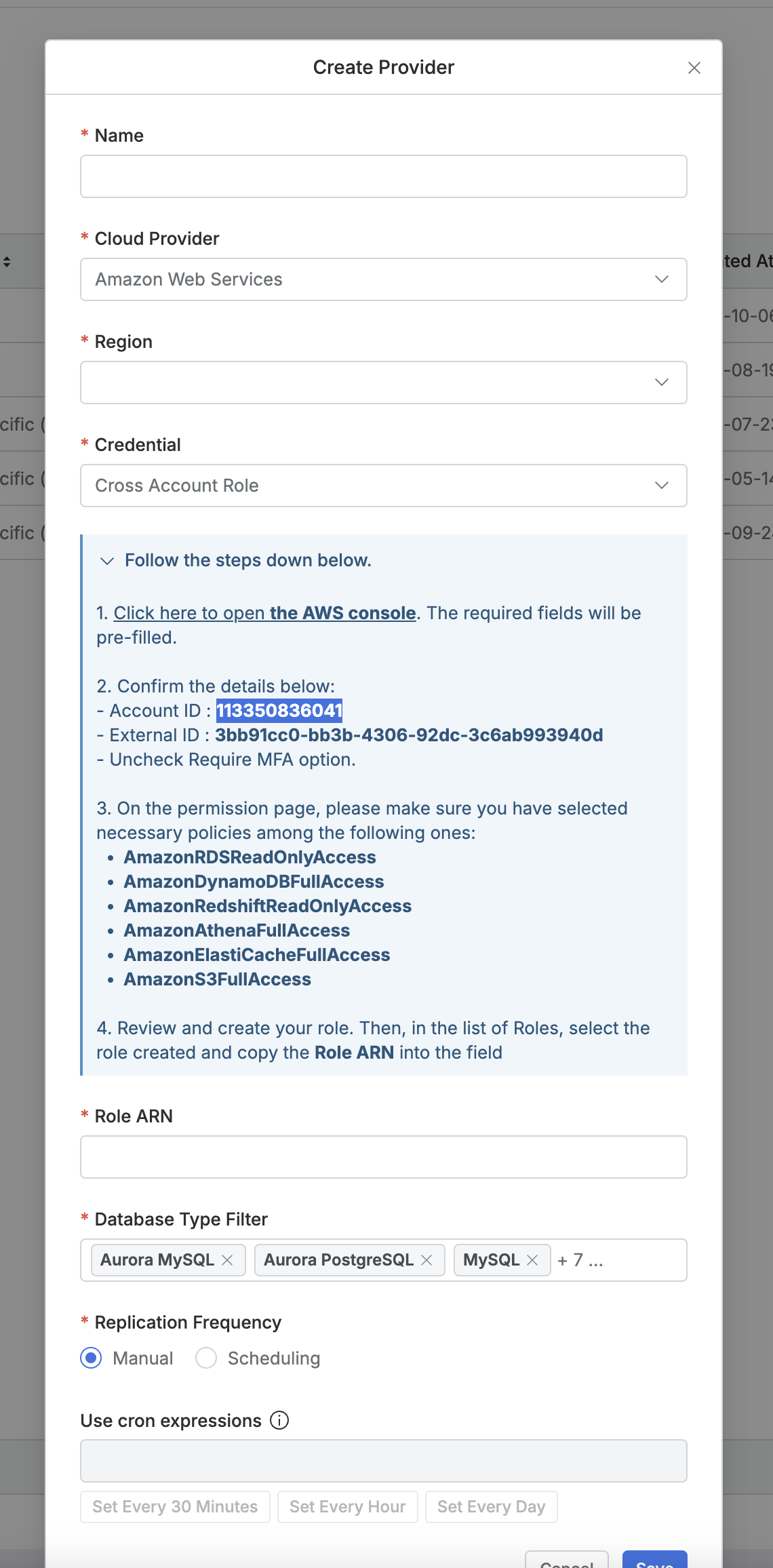
AWS_ACCOUNT_ID | In version 10.3.0 or later, this value is not entered. This value is automatically selected. This value is used when setting QueryPie Admin > CloudProvider > CrossAccountRole. | |
REDIS_HOST | In version 10.2.1 or later, this value has been replaced by REDIS_NODES. Redis Hostname or IP Address - Used by QueryPie Container to store cache data.
For PoC purposes, if you install QueryPie Container, Redis Container, etc. all on a Single Machine, you can enter | |
REDIS_PORT |
| In version 10.2.1 or later, this value has been replaced by REDIS_NODES. Redis TCP Port |
REDIS_CONNECTION_MODE |
| In version 10.3.0 or later, this value is not entered. This value is automatically selected. Use a value of |
CABINET_DATA_DIR | In version 10.2.8 or later, this value is not entered. It is replaced by OVEN component settings. This is the location where images used for SAC > RDP(WinSAC) session recording are stored in the EC2 instance server filesystem.
( |
FAQ
Q: Can I use 127.0.0.1 or localhost for DB_HOST and REDIS_HOST?
A: You cannot use 127.0.0.1 or localhost for DB_HOST and REDIS_HOST.
In a Single Machine configuration, you can install both MySQL and Redis on one Linux machine.
At this time, QueryPie Container uses bridge mode, which is the default network mode.
In bridge mode, 127.0.0.1 and localhost can only communicate between processes inside the container.
Since MySQL and Redis run in separate Containers, QueryPie Container cannot connect to MySQL and Redis using 127.0.0.1 or localhost addresses.
In this case, you can use the host.docker.internal address to connect to the Docker Host, that is, the host network of the Linux machine where the docker daemon is running.
Q: Is it okay to change AGENT_SECRET during operation?
A: We recommend not changing it because the procedure is complicated and causes inconvenience to customer users.
If you change this value, you must apply the following procedure.
- Change the value in the compose-env file and restart the QueryPie Container.
- In dualization or multi-configuration, all QueryPie Containers must have the same value.
- ⚠️ User Agent users must delete (uninstall) the installed User Agent and then reinstall it.
If you are unsure what value to generate initially, you can use a value generated by uuidgen | tr -d '-' in a Linux terminal.
This environment variable is planned to be replaced by a method where the server configures itself without user input.
Q. Can I change KEY_ENCRYPTION_KEY during operation?
A: You cannot change this value. You must keep the value used during initial installation.
If you lose this value or specify a changed value as an environment variable, QueryPie Container cannot read the encrypted sensitive data in the operating QueryPie Meta DB. As a result, QueryPie Container cannot function properly.
There are no constraints on the length or type of characters required for this environment variable value.
For example, there are no constraints such as it must be 8 characters or more, or special characters must be included.
Although we do not recommend using such values, even if a user sets a simple value like 1, QueryPie will function normally.
However, we recommend consulting with your customer’s security officer to set it according to your customer’s internal information security policies and guidelines.
Q: Is AWS_ACCOUNT_ID a required value? What value should I enter?
A: In QueryPie 10.3.0 or later, you do not enter AWS_ACCOUNT_ID. QueryPie Server Container automatically detects this value.
The AWS_ACCOUNT_ID environment variable value is used as the default value when creating a Role in the target Account when using CrossAccount Role in Cloud Provider settings in the Web Console. The Account ID value shown in the screenshot below is the value provided from the AWS_ACCOUNT_ID environment variable.
It is used in the Account ID section as shown in the figure below.
Q: I do not use SAC or RDP functionality. Can I remove the CABINET_DATA_DIR item?
A: In QueryPie 10.3.0 or later, the CABINET_DATA_DIR item is not used. It has been replaced by OVEN component settings.
Q: Is Redis configuration required?
A: QueryPie Container’s server software uses Redis as an essential component.
Redis is used for the following purposes.
- Caching session metadata of connected web servers
- Message queue for background tasks within server applications
However, even if data stored in Redis is lost, critical issues do not occur. Specific tasks and user requests that were running at that time will fail. If you restart Redis and QueryPie Container, QueryPie Container will function normally.
Environment Variables for Advanced Features
Please refer to the Environment Variables for Advanced Setup - 10.3.x (KO) page.