System Architecture and Network Access Control
System Architecture
Learn how QueryPie Server, QueryPie User Agent, Web Browser on User PC, and systems such as Database and Linux Server that users want to access are configured and connected.
System Architecture Diagram
This system architecture is for the case of installing QueryPie Service on a single Linux server. It does not include web services with TLS certificates applied, multi-configuration for high availability, etc.
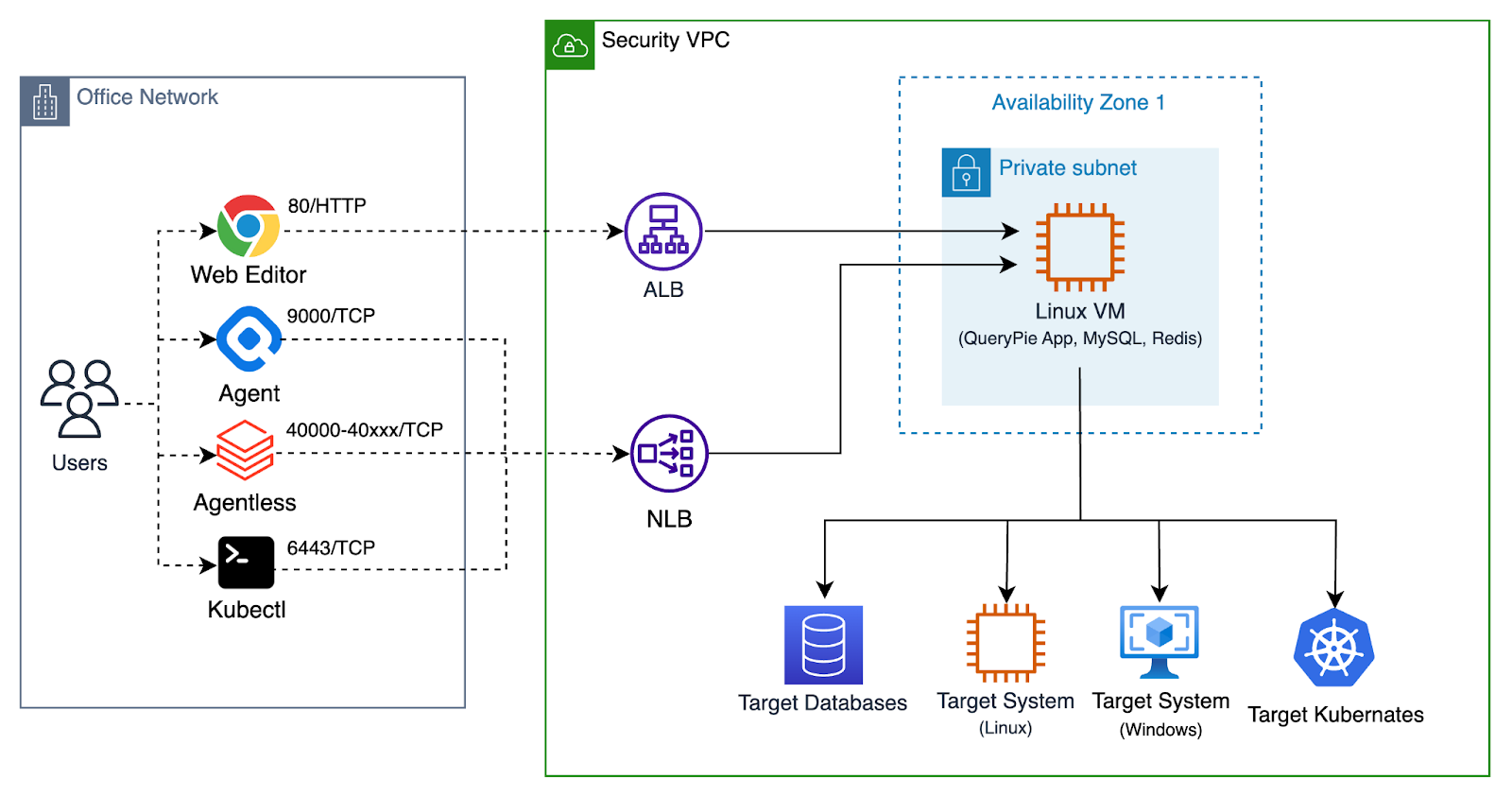
Overview of QueryPie System Architecture
Descriptions of each component are as follows.
Web Browser on User PC
Users access QueryPie web service through a web browser on their PC. A web browser is essential to use QueryPie. QueryPie administrators and security policy operators manage QueryPie services through QueryPie Web Console.
Also, QueryPie users can access target systems through QueryPie Web SQL Editor and Web Terminal.
QueryPie User Agent on User PC
When using Database Client Applications or SSH Client Applications running on User PC, QueryPie User Agent is required. QueryPie User Agent performs the role of a Local Proxy Agent running on User PC. You can download QueryPie User Agent by logging into QueryPie Web Console.
QueryPie User Agent supports most Database Client Applications and SSH Client Applications running on User PC.
(Hereafter referred to as 3rd Party Tool.)
For specific examples, please refer to this document: Supported 3rd Party Tools (KO)
QueryPie Server
QueryPie Server running on Linux VM provides Web Console, Web SQL Editor, and Web Terminal as web services. It also performs a core role of providing a Proxy server that understands SQL protocol and ssh protocol and performs access control.
QueryPie Server requires two components.
- QueryPie Database
- QueryPie Redis
QueryPie Database
QueryPie Database stores data for QueryPie Server operation. It stores QueryPie’s User Account, Admin Account, information about systems to connect to, access control policies, etc. It also stores Audit information such as User’s Query Log and System Access Log.
You can use MySQL, MariaDB, or compatible Databases as QueryPie Database.
- AWS Aurora MySQL
- GCP Cloud SQL for MySQL
QueryPie Redis
QueryPie Redis performs a Cache role for QueryPie Server operation. It is a component that is essential for QueryPie Server to operate.
Target Database
This is the Database server that users want to access. QueryPie Server performs an intermediary role between users and Target Database.
Target Server System
This is a system such as Linux Server or Windows Server that users want to access. QueryPie Server performs an intermediary role between users and Target Server System.
Network Access Control Settings
Network Access Types
Centered on the Linux VM where QueryPie is installed, network connections are divided into two types: Outbound and Inbound.
- Outbound: Network access from the Linux VM where QueryPie is installed to the external internet.
- Inbound: Network access from user PCs or customer’s internal network to the Linux VM where QueryPie is installed.
Network Access for Software Installation
| Access Type | Source | Destination | Protocol | Port | Description |
|---|---|---|---|---|---|
| Outbound | QueryPie Server | FQDN: dl.querypie.comIPv4 Address: 18.67.51.51,18.67.51.67,18.67.51.73,18.67.51.76 | TCP | 443 | This is a website for downloading configuration files for product installation. |
| Outbound | QueryPie Server | FQDN: harbor.querypie.ioIPv4 Address: 15.164.47.8, 52.79.197.102 | TCP | 443 | This is a website for downloading Docker Images for product installation. In Docker terms, this is a Docker Registry. |
Network Access for Product Use
The items below explain network access for product use. They are divided into Common, DAC, SAC, KAC, and WAC according to QueryPie product features.
Common
| Access Type | Source | Destination | Service | Protocol | Port | Description |
|---|---|---|---|---|---|---|
| Inbound | PC of Admin User | QueryPie Server | SSH | TCP | 22 | Installation and management |
| Inbound | PC of Admin User | QueryPie Server | HTTP | TCP | 80 | QueryPie Web Console |
| Inbound | PC of Admin User | QueryPie Server | HTTPS | TCP | 443 | QueryPie Web Console |
| Inbound | PC of Admin User | QueryPie Server | Custom TCP | TCP | 9000 | QueryPie Proxy for User Agent |
| Inbound | PC of Admin User | QueryPie Server | MySQL | TCP | 3306 | (Optional) QueryPie Meta DB |
| Inbound | PC of Admin User | QueryPie Server | Redis | TCP | 6379 | (Optional) QueryPie CacheDB |
| Inbound | All the users | QueryPie Server or Application Load Balancer | HTTP | TCP | 80 | QueryPie Web Console |
| Inbound | All the users | QueryPie Server or Application Load Balancer | HTTPS | TCP | 443 | ( Recommended ) QueryPie Web Console |
| Inbound | All the users | QueryPie Server or Network Load Balancer | Custom TCP | TCP | 9000 | ( Recommended ) QueryPie Proxy for User Agent |
DAC
| Access Type | Source | Destination | Type | Protocol | Port Range | Description |
|---|---|---|---|---|---|---|
| Inbound | Users or Systems connecting to Agentless Proxy | QueryPie Server | Custom TCP | TCP | 40000 - 41000 | ( Recommended ) QueryPie Agentless Proxy |
| Inbound | Users or Systems connecting to Agentless Proxy | QueryPie Server | Custom TCP | TCP | 41001 - 45000 | (Optional) More ports for QueryPie Agentless Proxy |
SAC
| Access Type | Source | Destination | Type | Protocol | Port | Description |
|---|---|---|---|---|---|---|
| Outbound | QueryPie Server | Target Linux Servers | SSH | TCP | 22 | When Users access target linux machines via QueryPie |
| Outbound | QueryPie Server | Target Windows Servers | RDP | TCP | 3389 | When Admin installs QueryPie RDP Agent on target Windows Servers. |
| Outbound | QueryPie Server | Target Windows Servers | Custom RDP | TCP | 13389 | When Users access target Windows Servers via QueryPie |
| Outbound | QueryPie Server | Target Windows Servers | Custom TCP | TCP | 13390 | Obsoleted - Port 13390 is not used anymore since version 10.2.2 |
KAC
| Access Type | Source | Destination | Type | Protocol | Port | Description |
|---|---|---|---|---|---|---|
| Inbound | All the users | QueryPie Server or Network Load Balancer | Custom TCP | TCP | 6443 | From Users to QueryPie KAC Proxy |
| Outbound | QueryPie Server | Target Kubernetes Cluster | Custom TCP | TCP | 6443 | From QueryPie Server to target Kubernetes Clusters |
WAC
| Access Type | Source | Destination | Type | Protocol | Port | Description |
|---|---|---|---|---|---|---|
| Inbound | All the users | QueryPie Server or Network Load Balancer | Custom TCP | TCP | 7447 | From Users to QueryPie WAC Proxy |
Load Balancer Settings
This table explains settings for applying Load Balancer to QueryPie Service for load distribution and fault tolerance.
| LB | Listener | Target | Health Check | LB Option | Description |
|---|---|---|---|---|---|
| Application Load Balancer (L7) | HTTP / 80 | - | None | default | Redirection to HTTPS |
| Application Load Balancer (L7) | HTTPS / 443 | http://querypie:80 | http://querypie:80/readyz | Sticky Session | QueryPie Web Console |
| Network Load Balancer (L4) | TCP / 9000 | querypie:9000 | http://querypie:80/readyz | default | QueryPie Agent (DAC, SAC) |
| Network Load Balancer (L4) | TCP / 6443 | querypie:6443 | http://querypie:80/readyz | default | QueryPie Agent (KAC) |
| Network Load Balancer (L4) | TCP / 7447 | querypie:7447 | http://querypie:80/readyz | default | QueryPie Agent (WAC) |