システムアーキテクチャとネットワークアクセス制御
システムアーキテクチャ
QueryPie Server、QueryPie User Agent、User PCのWeb Browser、そして利用者のアクセス対象であるDatabase、Linux Serverなどのシステムがどのように構成され、接続されるかを確認します。
システムアーキテクチャ構成図
このシステムアーキテクチャは単一LinuxサーバにQueryPie Serviceをインストールする場合のアーキテクチャです。 TLS証明書を適用したウェブサービス、高可用性のための多重化構成などは含まれません。
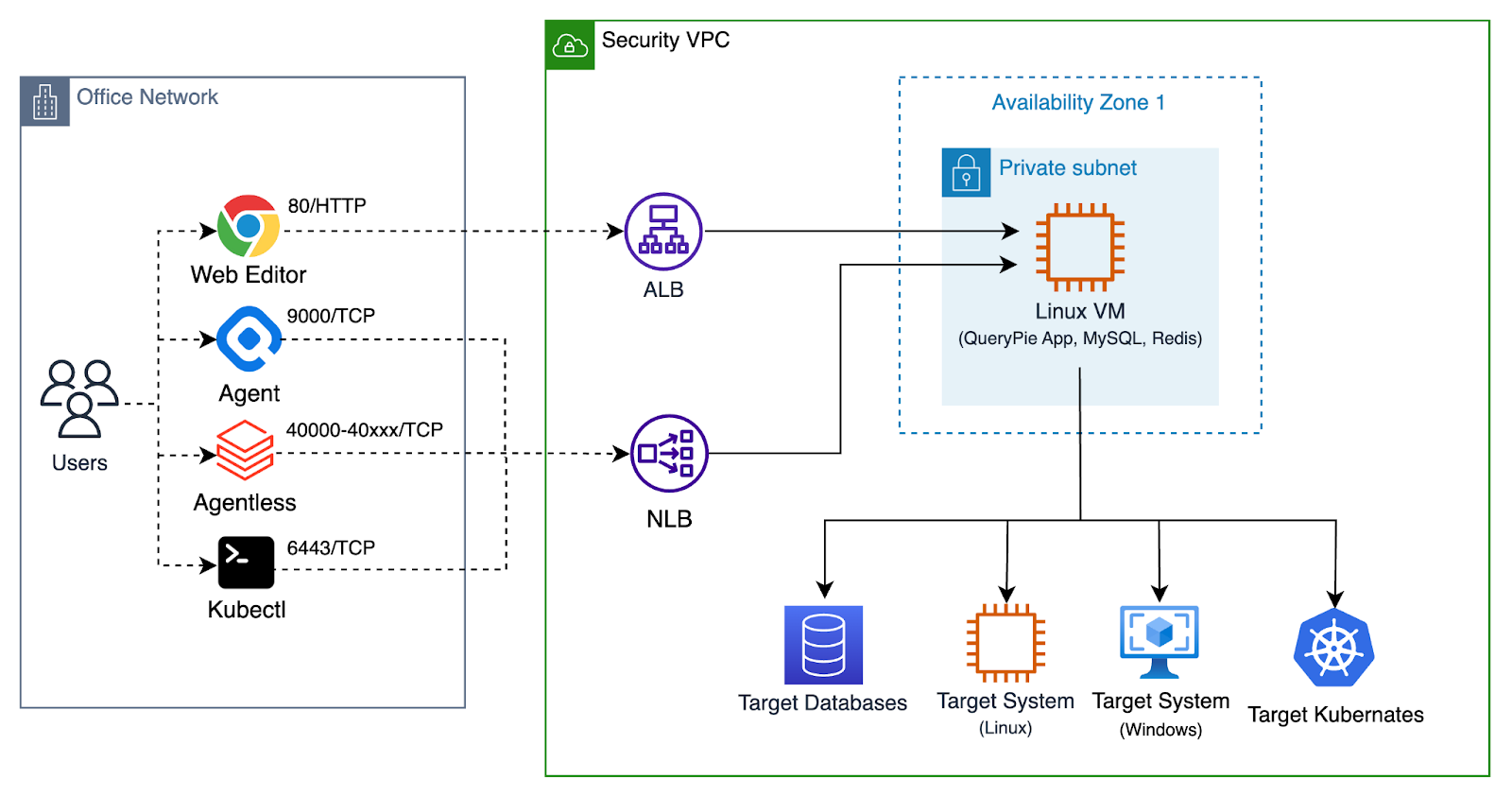
Overview of QueryPie System Architecture
各コンポーネントに関する説明は以下のとおりです。
User PCのWeb Browser
利用者のPCからウェブブラウザを通じてQueryPieウェブサービスに接続します。 QueryPieを利用するにはウェブブラウザが必須です。 QueryPie管理者、セキュリティポリシー運営者はQueryPie Web Consoleを通じてQueryPieサービスを管理します。
また、QueryPie利用者はQueryPie Web SQL Editor、Web Terminalを通じて対象システムにアクセスできます。
User PCのQueryPie User Agent
User PCで動作するDatabase Client Application、SSH Client Applicationを利用する場合、QueryPie User Agentが必要です。 QueryPie User AgentはUser PCで動作するLocal Proxy Agentの役割を実行します。 QueryPie Web Consoleにログインすると、QueryPie User Agentをダウンロードできます。
QueryPie User AgentはUser PCで動作する大部分のDatabase Client Application、SSH Client Applicationをサポートします。
(以降3rd Party Toolと表記します。)
具体的な事例はこの文書を参照してください:Supported 3rd Party Tools (KO)
QueryPie Server
Linux VMで動作するQueryPie ServerはWeb Console、Web SQL Editor、Web Terminalをウェブサービスとして提供します。 またSQL protocol、ssh protocolを理解してアクセス制御を実行するProxy serverを提供する核心的な役割を実行します。
QueryPie Serverは2つのコンポーネントを必要とします。
- QueryPie Database
- QueryPie Redis
QueryPie Database
QueryPie DatabaseはQueryPie Serverの動作のためのデータを保存します。 QueryPieのUser Account、Admin Account、接続対象システムの情報、アクセス制御ポリシーなどを保存します。 さらに、UserのQuery Log、System Access LogなどAudit情報を保存します。
MySQL、MariaDBまたは互換性のあるDatabaseをQueryPie Databaseとして使用できます。
- AWS Aurora MySQL
- GCP Cloud SQL for MySQL
QueryPie Redis
QueryPie RedisはQueryPie Serverの動作のためのCache役割を実行します。 QueryPie Serverが動作するために、必須として要求されるコンポーネントです。
Target Database
利用者がアクセスを希望するDatabaseサーバです。 QueryPie Serverは利用者とTarget Database間の中継役割を実行します。
Target Server System
利用者がアクセスを希望するLinux Server、Windows Serverなどのシステムです。 QueryPie Serverは利用者とTarget Server System間の中継役割を実行します。
ネットワークアクセス制御設定
ネットワークアクセスタイプ
QueryPieがインストールされたLinux VMを中心に、ネットワーク接続をOutbound、Inbound、2つのタイプに区分します。
- Outbound:QueryPieがインストールされたLinux VMから、外部インターネットに接続するネットワークアクセスです。
- Inbound:利用者のPCまたは顧客社内部ネットワークから、QueryPieがインストールされたLinux VMに接続するネットワークアクセスです。
ソフトウェアインストールのためのネットワークアクセス
| Access Type | Source | Destination | Protocol | Port | Description |
|---|---|---|---|---|---|
| Outbound | QueryPie Server | FQDN: dl.querypie.comIPv4 Address: 18.67.51.51,18.67.51.67,18.67.51.73,18.67.51.76 | TCP | 443 | 製品インストールのための設定ファイルをダウンロードするwebsiteです。 |
| Outbound | QueryPie Server | FQDN: harbor.querypie.ioIPv4 Address: 15.164.47.8, 52.79.197.102 | TCP | 443 | 製品インストールのために、Docker Imageをダウンロードするwebsiteです。docker用語ではDocker Registryです。 |
製品使用のためのネットワークアクセス
以下の項目は製品使用のためのネットワークアクセスを説明します。 QueryPie製品の機能に従って、共通、DAC、SAC、KAC、WACに区分します。
共通
| Access Type | Source | Destination | Service | Protocol | Port | Description |
|---|---|---|---|---|---|---|
| Inbound | PC of Admin User | QueryPie Server | SSH | TCP | 22 | Installation and management |
| Inbound | PC of Admin User | QueryPie Server | HTTP | TCP | 80 | QueryPie Web Console |
| Inbound | PC of Admin User | QueryPie Server | HTTPS | TCP | 443 | QueryPie Web Console |
| Inbound | PC of Admin User | QueryPie Server | Custom TCP | TCP | 9000 | QueryPie Proxy for User Agent |
| Inbound | PC of Admin User | QueryPie Server | MySQL | TCP | 3306 | (Optional) QueryPie Meta DB |
| Inbound | PC of Admin User | QueryPie Server | Redis | TCP | 6379 | (Optional) QueryPie CacheDB |
| Inbound | All the users | QueryPie Server or Application Load Balancer | HTTP | TCP | 80 | QueryPie Web Console |
| Inbound | All the users | QueryPie Server or Application Load Balancer | HTTPS | TCP | 443 | ( Recommended ) QueryPie Web Console |
| Inbound | All the users | QueryPie Server or Network Load Balancer | Custom TCP | TCP | 9000 | ( Recommended ) QueryPie Proxy for User Agent |
DAC
| Access Type | Source | Destination | Type | Protocol | Port Range | Description |
|---|---|---|---|---|---|---|
| Inbound | Users or Systems connecting to Agentless Proxy | QueryPie Server | Custom TCP | TCP | 40000 - 41000 | ( Recommended ) QueryPie Agentless Proxy |
| Inbound | Users or Systems connecting to Agentless Proxy | QueryPie Server | Custom TCP | TCP | 41001 - 45000 | (Optional) More ports for QueryPie Agentless Proxy |
SAC
| Access Type | Source | Destination | Type | Protocol | Port | Description |
|---|---|---|---|---|---|---|
| Outbound | QueryPie Server | Target Linux Servers | SSH | TCP | 22 | When Users access target linux machines via QueryPie |
| Outbound | QueryPie Server | Target Windows Servers | RDP | TCP | 3389 | When Admin installs QueryPie RDP Agent on target Windows Servers. |
| Outbound | QueryPie Server | Target Windows Servers | Custom RDP | TCP | 13389 | When Users access target Windows Servers via QueryPie |
| Outbound | QueryPie Server | Target Windows Servers | Custom TCP | TCP | 13390 | Obsoleted - Port 13390 is not used anymore since version 10.2.2 |
KAC
| Access Type | Source | Destination | Type | Protocol | Port | Description |
|---|---|---|---|---|---|---|
| Inbound | All the users | QueryPie Server or Network Load Balancer | Custom TCP | TCP | 6443 | From Users to QueryPie KAC Proxy |
| Outbound | QueryPie Server | Target Kubernetes Cluster | Custom TCP | TCP | 6443 | From QueryPie Server to target Kubernetes Clusters |
WAC
| Access Ty pe | Source | Destination | Type | Protocol | Port | Description |
|---|---|---|---|---|---|---|
| Inbound | All the users | QueryPie Server or Network Load Balancer | Custom TCP | TCP | 7447 | From Users to QueryPie WAC Proxy |
Load Balancers設定
負荷分散、障害耐性を備えるために、QueryPie ServiceにLoad Balancerを適用する設定を表で説明します。
| LB | Listener | Target | Health Check | LB Option | Description |
|---|---|---|---|---|---|
| Application Load Balancer (L7) | HTTP / 80 | - | None | default | Redirection to HTTPS |
| Application Load Balancer (L7) | HTTPS / 443 | http://querypie:80 | http://querypie:80/readyz | Sticky Session | QueryPie Web Console |
| Network Load Balancer (L4) | TCP / 9000 | querypie:9000 | http://querypie:80/readyz | default | QueryPie Agent (DAC, SAC) |
| Network Load Balancer (L4) | TCP / 6443 | querypie:6443 | http://querypie:80/readyz | default | QueryPie Agent (KAC) |
| Network Load Balancer (L4) | TCP / 7447 | querypie:7447 | http://querypie:80/readyz | default | QueryPie Agent (WAC) |