시스템 아키텍처와 네트워크 접근제어
시스템 아키텍처
QueryPie Server, QueryPie User Agent, User PC의 Web Browser, 그리고 이용자의 접근 대상인 Database, Linux Server 등의 시스템이 어떻게 구성되고 연결되는지 알아봅니다.
시스템 아키텍처 구성도
이 시스템 아키텍처는 단일 리눅스 서버에 QueryPie Service를 설치하는 경우의 아키텍처입니다. TLS 인증서를 적용한 웹서비스, 고가용성을 위한 다중화 구성 등을 포함하지 않습니다.
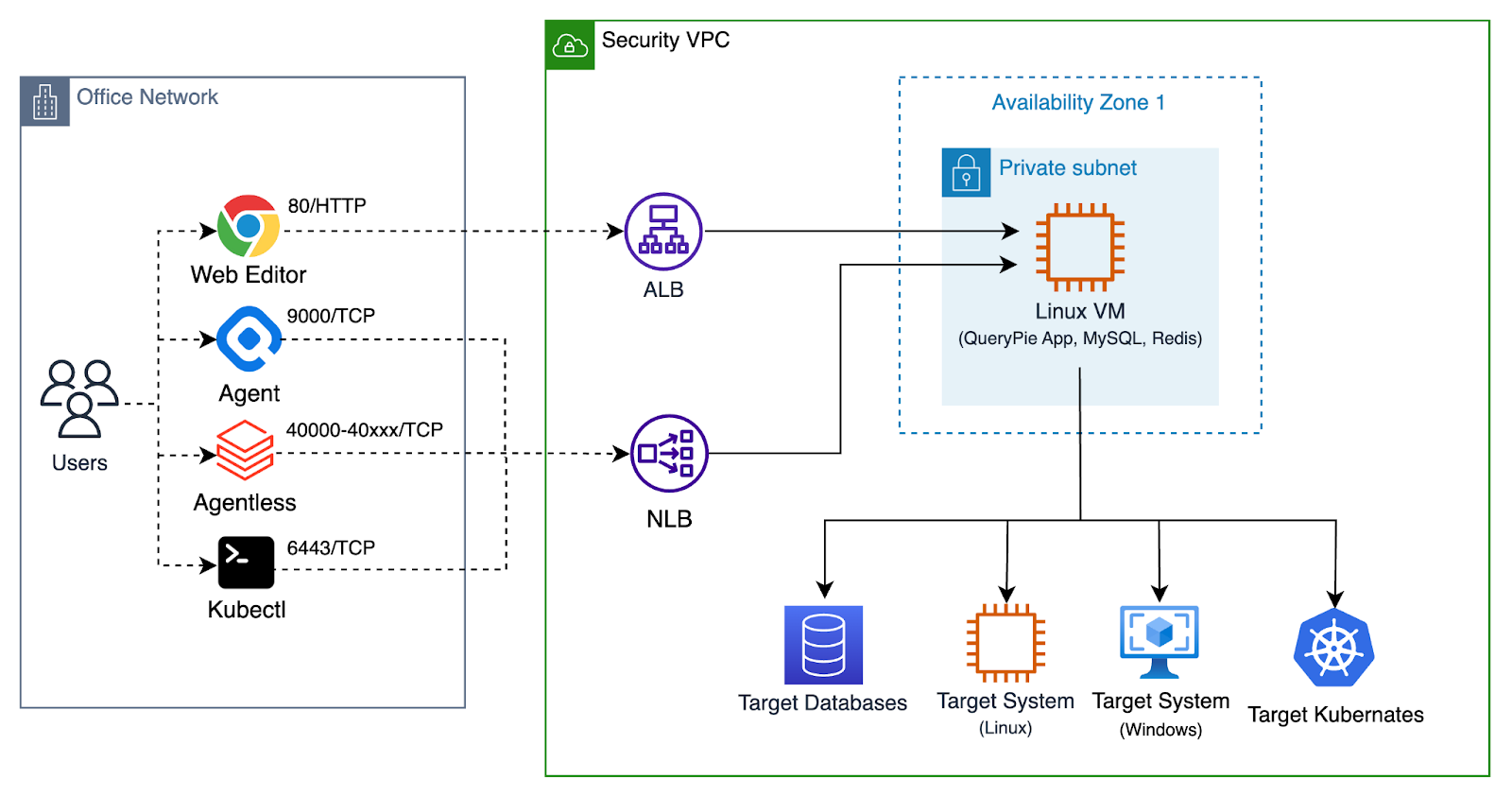
Overview of QueryPie System Architecture
각 컴포넌트에 대한 설명은 다음과 같습니다.
User PC의 Web Browser
이용자의 PC에서 웹 브라우저를 통해 QueryPie 웹 서비스에 접속합니다. QueryPie를 이용하려면 웹 브라우저가 필수적입니다. QueryPie 관리자, 보안정책 운영자는 QueryPie Web Console을 통해 QueryPie 서비스를 관리합니다.
또한, QueryPie 사용자는 QueryPie Web SQL Editor, Web Terminal 을 통해 대상 시스템에 접근할 수 있습니다.
User PC 의 QueryPie User Agent
User PC 에서 작동하는 Database Client Application, SSH Client Application 를 이용하는 경우, QueryPie User Agent 가 필요합니다. QueryPie User Agent 는 User PC 에서 작동하는 Local Proxy Agent 의 역할을 수행합니다. QueryPie Web Console 에 로그인하면, QueryPie User Agent 를 다운로드 받을 수 있습니다.
QueryPie User Agent 는 User PC 에서 작동하는 대부분의 Database Client Application, SSH Client Application 을 지원합니다.
(이후 3rd Party Tool 이라고 표기합니다.)
구체적인 사례는 이 문서를 참조하세요: Supported 3rd Party Tools (KO)
QueryPie Server
Linux VM 에서 작동하는 QueryPie Server 는 Web Console, Web SQL Editor, Web Terminal 을 웹서비스로 제공합니다. 또한 SQL protocol, ssh protocol을 이해하고 접근제어를 수행하는 Proxy server를 제공하는 핵심적 역할을 수행합니다.
QueryPie Server 는 두 가지 컴포넌트를 필요로 합니다.
- QueryPie Database
- QueryPie Redis
QueryPie Database
QueryPie Database 는 QueryPie Server 의 작동을 위한 데이터를 저장합니다. QueryPie 의 User Account, Admin Account, 연결 대상 시스템의 정보, 접근제어 정책 등을 저장합니다. 뿐만 아니라, User 의 Query Log, System Access Log 등 Audit 정보를 저장합니다.
MySQL, MariaDB 또는 호환되는 Database 를 QueryPie Database 로 사용할 수 있습니다.
- AWS Aurora MySQL
- GCP Cloud SQL for MySQL
QueryPie Redis
QueryPie Redis 는 QueryPie Server 의 작동을 위한 Cache 역할을 수행합니다. QueryPie Server 가 작동하기 위해, 필수로 요구되는 컴포넌트입니다.
Target Database
이용자가 접근을 원하는 Database 서버입니다. QueryPie Server 는 이용자와 Target Database 사이의 중계 역할을 수행합니다.
Target Server System
이용자가 접근을 원하는 Linux Server, Windows Server 등의 시스템입니다. QueryPie Server 는 이용자와 Target Server System 사이의 중계 역할을 수행합니다.
네트워크 접근제어 설정
네트워크 접근 유형
QueryPie 가 설치된 Linux VM 을 중심으로, 네트워크 연결을 Outbound, Inbound, 두 가지 유형으로 구분합니다.
- Outbound : QueryPie 가 설치된 Linux VM 에서, 외부 인터넷으로 연결하는 네트워크 접근입니다.
- Inbound : 이용자의 PC 또는 고객사 내부 네트워크에서, QueryPie 가 설치된 Linux VM 으로 연결하는 네트워크 접근입니다.
소프트웨어 설치를 위한 네트워크 접근
| Access Type | Source | Destination | Protocol | Port | Description |
|---|---|---|---|---|---|
| Outbound | QueryPie Server | FQDN: dl.querypie.comIPv4 Address: 18.67.51.51,18.67.51.67,18.67.51.73,18.67.51.76 | TCP | 443 | 제품 설치를 위한 설정파일을 내려받는 website 입니다. |
| Outbound | QueryPie Server | FQDN: harbor.querypie.ioIPv4 Address: 15.164.47.8, 52.79.197.102 | TCP | 443 | 제품 설치를 위해, Docker Image 를 내려받는 website 입니다. docker 용어로는 Docker Registry 입니다. |
제품 사용을 위한 네트워크 접근
아래의 항목은 제품 사용을 위한 네트워크 접근을 설명합니다. QueryPie 제품의 기능에 따라, 공통, DAC, SAC, KAC, WAC 로 구분합니다.
공통
| Access Type | Source | Destination | Service | Protocol | Port | Description |
|---|---|---|---|---|---|---|
| Inbound | PC of Admin User | QueryPie Server | SSH | TCP | 22 | Installation and management |
| Inbound | PC of Admin User | QueryPie Server | HTTP | TCP | 80 | QueryPie Web Console |
| Inbound | PC of Admin User | QueryPie Server | HTTPS | TCP | 443 | QueryPie Web Console |
| Inbound | PC of Admin User | QueryPie Server | Custom TCP | TCP | 9000 | QueryPie Proxy for User Agent |
| Inbound | PC of Admin User | QueryPie Server | MySQL | TCP | 3306 | (Optional) QueryPie Meta DB |
| Inbound | PC of Admin User | QueryPie Server | Redis | TCP | 6379 | (Optional) QueryPie CacheDB |
| Inbound | All the users | QueryPie Server or Application Load Balancer | HTTP | TCP | 80 | QueryPie Web Console |
| Inbound | All the users | QueryPie Server or Application Load Balancer | HTTPS | TCP | 443 | (Recommended) QueryPie Web Console |
| Inbound | All the users | QueryPie Server or Network Load Balancer | Custom TCP | TCP | 9000 | (Recommended) QueryPie Proxy for User Agent |
DAC
| Access Type | Source | Destination | Type | Protocol | Port Range | Description |
|---|---|---|---|---|---|---|
| Inbound | Users or Systems connecting to Agentless Proxy | QueryPie Server | Custom TCP | TCP | 40000 - 41000 | (Recommended) QueryPie Agentless Proxy |
| Inbound | Users or Systems connecting to Agentless Proxy | QueryPie Server | Custom TCP | TCP | 41001 - 45000 | (Optional) More ports for QueryPie Agentless Proxy |
SAC
| Access Type | Source | Destination | Type | Protocol | Port | Description |
|---|---|---|---|---|---|---|
| Outbound | QueryPie Server | Target Linux Servers | SSH | TCP | 22 | When Users access target linux machines via QueryPie |
| Outbound | QueryPie Server | Target Windows Servers | RDP | TCP | 3389 | When Admin installs QueryPie RDP Agent on target Windows Servers. |
| Outbound | QueryPie Server | Target Windows Servers | Custom RDP | TCP | 13389 | When Users access target Windows Servers via QueryPie |
| Outbound | QueryPie Server | Target Windows Servers | Custom TCP | TCP | 13390 | Obsoleted - Port 13390 is not used anymore since version 10.2.2 |
KAC
| Access Type | Source | Destination | Type | Protocol | Port | Description |
|---|---|---|---|---|---|---|
| Inbound | All the users | QueryPie Server or Network Load Balancer | Custom TCP | TCP | 6443 | From Users to QueryPie KAC Proxy |
| Outbound | QueryPie Server | Target Kubernetes Cluster | Custom TCP | TCP | 6443 | From QueryPie Server to target Kubernetes Clusters |
WAC
| Access Type | Source | Destination | Type | Protocol | Port | Description |
|---|---|---|---|---|---|---|
| Inbound | All the users | QueryPie Server or Network Load Balancer | Custom TCP | TCP | 7447 | From Users to QueryPie WAC Proxy |
Load Balancers 설정
부하분산, 장애내성을 갖추기 위해, QueryPie Service 에 Load Balancer 를 적용하는 설정을 표로 설명합니다.
| LB | Listener | Target | Health Check | LB Option | Description |
|---|---|---|---|---|---|
| Application Load Balancer (L7) | HTTP / 80 | - | None | default | Redirection to HTTPS |
| Application Load Balancer (L7) | HTTPS / 443 | http://querypie:80 | http://querypie:80/readyz | Sticky Session | QueryPie Web Console |
| Network Load Balancer (L4) | TCP / 9000 | querypie:9000 | http://querypie:80/readyz | default | QueryPie Agent (DAC, SAC) |
| Network Load Balancer (L4) | TCP / 6443 | querypie:6443 | http://querypie:80/readyz | default | QueryPie Agent (KAC) |
| Network Load Balancer (L4) | TCP / 7447 | querypie:7447 | http://querypie:80/readyz | default | QueryPie Agent (WAC) |