QSI Parser Selection
Overview
This feature is available in version 11.6.x and later. (Provided as Beta from 11.6.0 through 11.6.4 and as a GA feature in 11.6.5)
QSI Parser is an option that can be selected when creating or editing a DB Connection for a Custom JDBC Vendor or a database with selectable parsers. QSI Parser refers to the parser that QueryPie uses to analyze SQL, and selecting a Parser that matches the syntax characteristics of the DB Vendor can improve query analysis and policy application compatibility.
| Database | Selectable Parsers | Version where parser selection became available |
|---|---|---|
| Custom Jdbc Vendor | ANSI, PostgreSQL, MySQL, Trino | 11.6.1 and later |
| Tibero | ANSI, Trino | 11.6.1 and later |
| Presto | ANSI, Trino | 11.6.1 and later |
| Teradata | ANSI, PostgreSQL, Trino | 11.6.1 and later |
| Cubrid | ANSI, MySQL | 11.6.2 and later |
| Snowflake | ANSI, PostgreSQL, Trino | 11.6.3 and later |
Configuring the QSI Parser
Configure the QSI Parser for a DB Connection where parser selection is available.
- Navigate to
Admin > Databases > Connection Management > DB Connections. - Click the
Create Connectionbutton in the upper right corner, or select an existing connection to go to the edit screen. - Scroll down and select the Custom JDBC Vendor you want to use from the Custom JDBC Vendors section. (Or select one of the previously mentioned Tibero, Presto, Teradata, Cubrid, or Snowflake entries.)
- Enter the connection information in the
Connection Informationsection. - Select the Use QSI Parser checkbox.
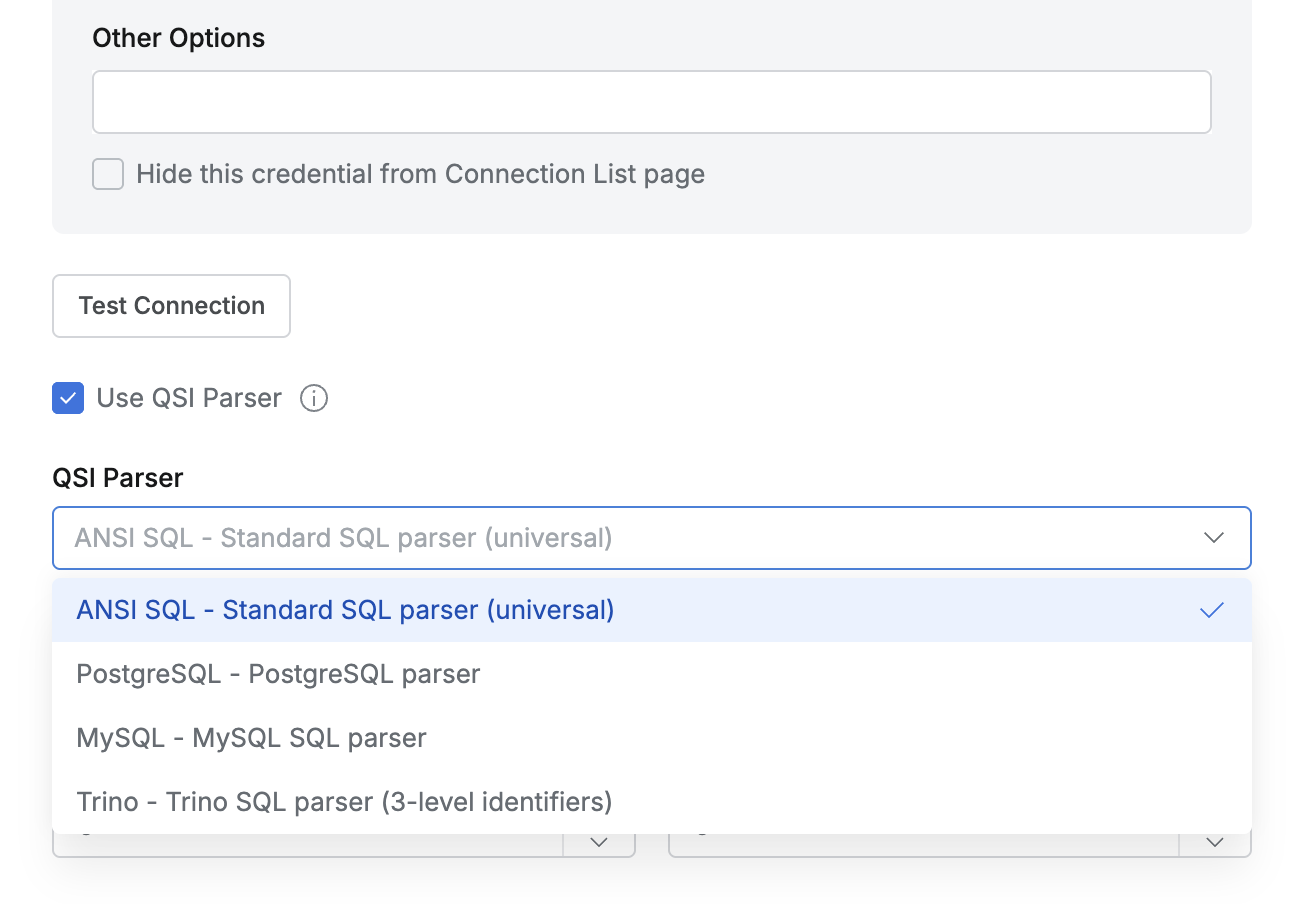
- A list of compatible Parsers is provided in a dropdown.
- Examples:
ANSI SQL,Oracle,PostgreSQL,MySQL,Trino
- Enter the remaining connection information and click the
Nextbutton to proceed to the connection creation complete screen.
QSI Parser Selection Criteria
It is recommended to select the QSI Parser that most closely matches the SQL syntax of the target database.
- ANSI SQL : Suitable for Vendors that use syntax similar to the SQL standard.
- Oracle : Suitable for Vendors that use Oracle-family syntax.
- PostgreSQL : Suitable for Vendors that use PostgreSQL-family syntax.
- MySQL : Suitable for Vendors that use MySQL-family syntax.
- Trino : Suitable for Vendors that use Trino-family syntax. The
3-level identifiersmentioned in the Trino Parser description refers to the three-level object identifier format ofcatalog.schema.table.
Selecting the wrong Parser may cause some SQL to be analyzed differently than expected. Select a Parser from the same family as the SQL syntax verified when registering the Custom JDBC Vendor.
Changing the QSI Parser
You can change the QSI Parser of an existing DB Connection.
- Select the connection you want to edit from
Admin > Databases > Connection Management > DB Connections. - Change the QSI Parser value in the
Connection Informationsection. (You can also clear the Use QSI Parser checkbox if needed. If policies are configured, they may be invalidated, so review carefully before changing this setting.) - Click the
Save Changesbutton to save.
After changing the setting, query analysis results for the connection may differ, so verify the behavior with representative SQL queries if needed.