Provisioning
Overview
SCIM (System for Cross-domain Identity Management) is an open standard protocol designed to manage user identity information, providing a defined schema representing users and groups and RESTful APIs to perform CRUD (Create, Read, Update, Delete) operations on those user and group resources. By integrating with the account system used by your organization, you can synchronize Attributes (attributes) and status corresponding to users and groups within your organization to QueryPie immediately as they are reflected in the account system.
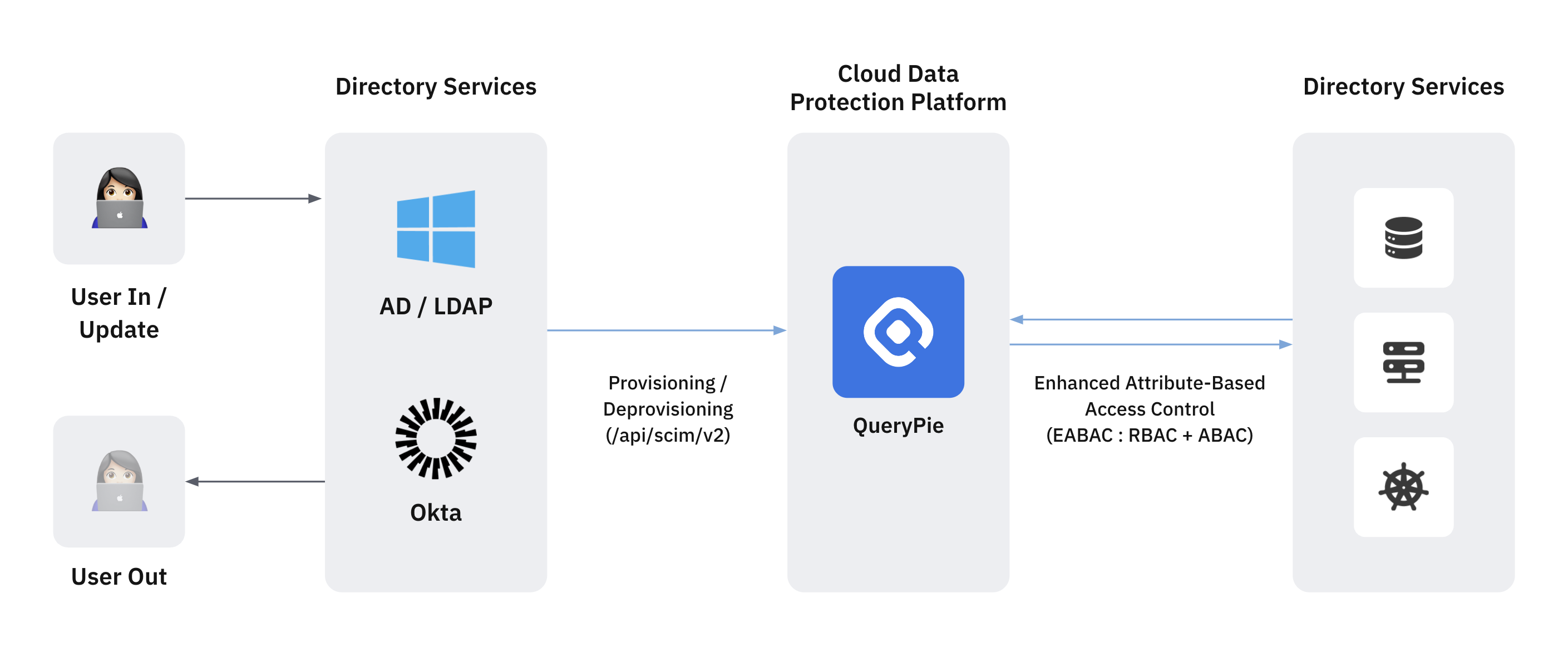
User Management Through Account System SCIM Synchronization
QueryPie defines user ledgers based on the Auth Provider field. This Auth Provider follows the external account system type configured in the Administrator > General > User Management > Authentication menu.
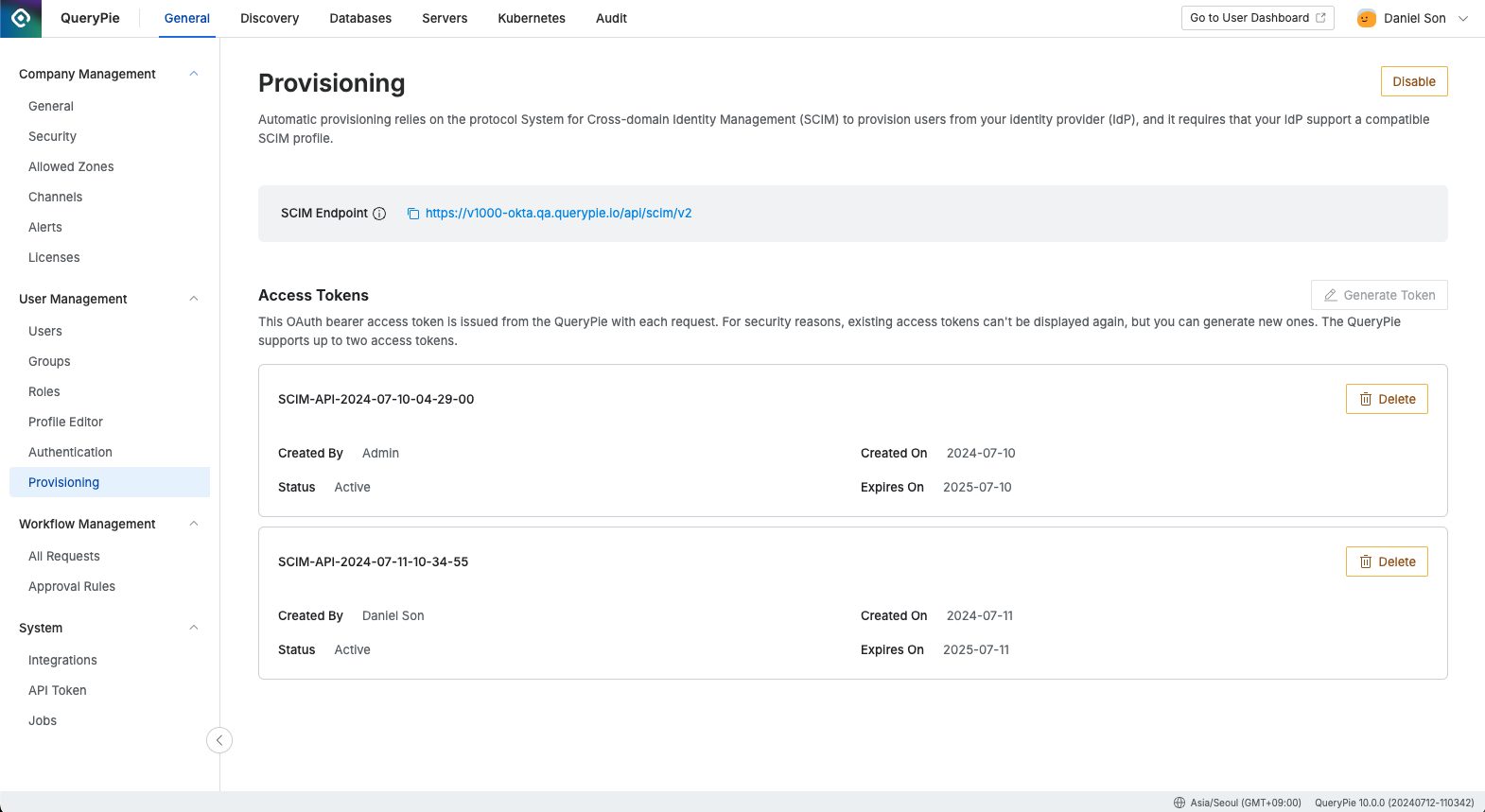
Administrator > General > User Management > Provisioning
Since general SCIM integration APIs cannot identify the authority, when a user is created through SCIM API calls, the Auth Provider follows the corresponding Authentication Type. Therefore, we recommend proceeding with the SSO account system integration procedure first for smoother account flow management. The system behavior according to this is as follows.
- Authentication Not Configured (Default: Internal Database)
- Auth Provider of users or groups created through SCIM API becomes “QueryPie” and operates as a general bulk import concept.
- Managed the same as local QueryPie accounts, and users can be edited and deleted in QueryPie.
- Authentication Configured (e.g., Okta)
- Auth Provider of users or groups created through SCIM API is marked as the corresponding Identity Provider (IdP), and user Attribute profile management is updated and managed according to Administrator > General > User Management > Profile Editor standards.
- When existing local QueryPie accounts with the same Username (loginId) receive update calls through SCIM API, the user’s profile is modified according to IdP, but to maintain granted permissions within QueryPie, the Auth Provider is not changed to the corresponding IdP first. (As of 9.19.0)
- Still managed the same as local QueryPie accounts, and user profiles and status can be edited and deleted in QueryPie.
- For actual consistency maintenance, we recommend managing user lifecycle in IdP.
- Synchronized users cannot be modified or deleted within QueryPie.
External ID Support
External ID is an external identifier used to reliably identify users between an IdP and QueryPie. (It is a mapping element used to reliably identify that user A in the IdP and user B in QueryPie are the same person.) Because External ID is optional in the SCIM RFC 7643 standard, it may not exist in the IdP. However, if an administrator needs an additional clear identifier, they can add and manage an External ID, and QueryPie can use it when it exists.
- Starting from 11.5.6, QueryPie stores the External ID of the User resource and includes it in responses.
- External ID cannot be duplicated within the same Auth Provider.
- Existing users can be re-identified based on External ID.
- If External ID exists, a deleted user can be restored with the same External ID. That is, even if a user has been deleted from QueryPie (soft-delete), the existing user can be reactivated if the IdP provisions the user again with the same externalId.
Patch Support
- Some IdPs use Patch when changing user attributes. Starting from 11.5.6, QueryPie also supports IdPs that use Patch-based updates.
SCIM Standard Error Delivery
Starting from 11.5.6, when a SCIM error occurs, QueryPie returns a standard error response in application/scim+json format.
Representative error examples:
- uniqueness
(409): Same externalId or duplicate identifier conflict- This usually occurs when “the same user already exists, but the IdP tries to create the user again as a new user.”
- If the goal is user reactivation, first check whether externalId is being delivered consistently with the existing user.
- Review the IdP mapping rules to determine whether to create the same user as a new account or reconnect the existing account.
- mutability
(400): Attempt to modify an immutable userName- This error can occur if the IdP uses a policy that changes the user’s login ID or account identifier.
- In QueryPie integration, it is safer to keep userName fixed after creation and operate user re-identification or reconnection based on externalId.
- invalidFilter
(400): Unsupported filter used- This is often seen during IdP testing when querying a specific user or validating mappings.
- Check whether the filter string sent uses attributes and formats supported by QueryPie.
- Especially when using custom attributes or complex combined filters, check compatibility.
- invalidValue
(400): Unsupported PATCH op used- This usually occurs when the PATCH request format sent by the IdP differs from the QueryPie implementation scope.
- You can identify the cause faster by first checking the op value and active value format in the PATCH body.